
A motherboard is the central printed circuit board (PCB) that connects all the components of a computer, allowing them to communicate with one another. Below are the primary components found on a standard motherboard:
1. CPU Socket
The CPU socket is the dedicated housing for the Central Processing Unit. It contains hundreds or thousands of small pins (or contact points) that transfer data between the processor and the rest of the board.
2. RAM Slots (DIMM Slots)
These long, thin slots hold the system’s memory modules. Modern motherboards typically have two to four slots supporting DDR4 or DDR5 RAM. They are usually color-coded to indicate “dual-channel” configurations for better performance.
3. Chipset
The chipset is the “brain” of the motherboard, acting as a communications hub and data flow controller. It determines how the CPU interacts with memory, storage, and peripheral devices. It is often covered by a heatsink to keep it cool.
4. Expansion Slots (PCI Express)
These slots allow you to add extra functionality to your computer by plugging in expansion cards.
-
PCIe x16: Mostly used for Graphics Cards (GPUs).
-
PCIe x1 or x4: Used for sound cards, Wi-Fi cards, or internal capture cards.
5. Storage Connectors
-
SATA Ports: Used to connect traditional 2.5-inch SSDs and 3.5-inch Hard Drives via cables.
-
M.2 Slots: Small, rectangular slots used for high-speed NVMe SSDs that plug directly into the board.
6. Power Connectors
The motherboard receives power from the Power Supply Unit (PSU) through two main points:
-
24-pin ATX Power: The largest connector, providing power to the board itself.
-
8-pin (or 4-pin) CPU Power: Located near the CPU socket to provide dedicated power to the processor.
7. VRM (Voltage Regulator Module)
The VRM consists of capacitors, chokes, and MOSFETs surrounding the CPU socket. Its job is to convert the high voltage from the PSU into the exact lower voltage required by the CPU. High-end boards often have large heatsinks covering these components.
8. CMOS Battery
A small, silver button-cell battery (usually CR2032) that provides power to the BIOS/UEFI chip. This ensures the motherboard remembers the system time, date, and hardware settings even when the computer is unplugged.
9. Input/Output (I/O) Panel
Located at the back of the motherboard, this area contains the external ports, including:
-
USB Ports (2.0, 3.0, Type-C)
-
Ethernet (RJ-45) port
-
Audio jacks (Line-in, Line-out, Mic)
-
Video outputs (HDMI, DisplayPort) for integrated graphics
10. BIOS/UEFI Chip
This is a non-volatile memory chip that stores the firmware. It is the first software to run when you turn on the computer, performing a “POST” (Power-On Self-Test) to ensure all hardware is functioning correctly before booting the operating system.
On a motherboard, the motherboard’s performance depends on thousands of tiny surface-mount devices (SMD) that manage electricity. While the CPU and RAM handle the logic, these discrete components handle the “power hygiene.”
Here is an explanation of the most common electronic components found on a motherboard and how they work:
1. Capacitors
Capacitors act like tiny, short-term batteries. They store electrical energy in an electric field and release it when needed.
-
Working: They consist of two conductive plates separated by an insulating material (dielectric). When voltage is applied, electrons build up on one plate.
-
Purpose on Motherboard: They “smooth” out the voltage. Power from a PSU can be “noisy” or spikey; capacitors absorb these spikes and fill in the gaps if the voltage drops, ensuring the CPU receives a perfectly steady stream of power.
-
Types: You will mostly see Solid Capacitors (silver cylinders) on modern boards because they are more heat-resistant than the older liquid-filled electrolytic ones.

2. Transistors (MOSFETs)
The most important transistors on a motherboard are MOSFETs (Metal-Oxide-Semiconductor Field-Effect Transistors).
-
Working: A transistor acts as a high-speed electronic switch or gate. It has three terminals: a Source, a Drain, and a Gate. When a small voltage is applied to the Gate, it allows a much larger current to flow from the Source to the Drain.
-
Purpose on Motherboard: They are the muscle of the VRM (Voltage Regulator Module). They switch on and off thousands of times per second to “chop” the 12V power from the PSU down to the ~1.2V required by your CPU.

3. Diodes
A diode is a one-way valve for electricity.
-
Working: It allows current to flow in one direction but blocks it completely in the opposite direction.
-
Purpose on Motherboard:
-
Protection: They prevent “reverse polarity” from damaging sensitive chips if a circuit malfunctions.
-
TVS Diodes: These are often placed near USB ports or HDMI ports to protect the board from Electrostatic Discharge (ESD). If you have static on your finger and touch a port, the diode shunts that extra energy to the ground before it can fry the chipset.
-

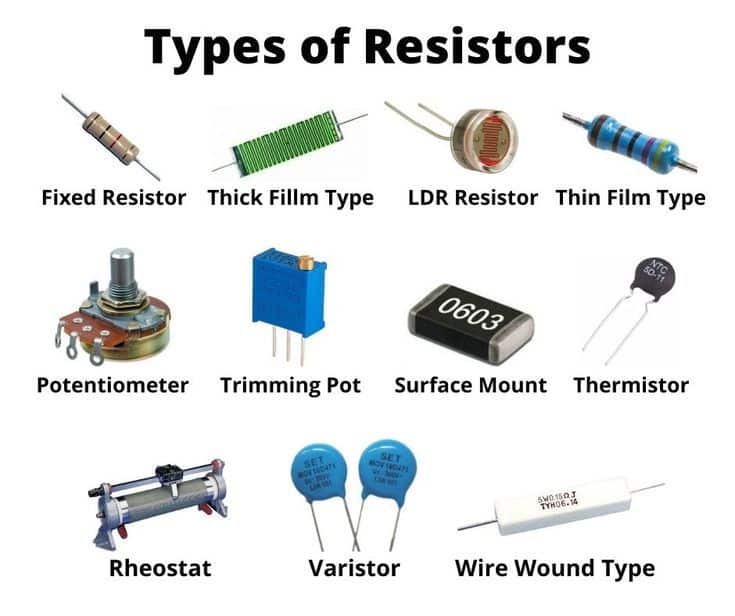
4. Resistors
As the name suggests, these components resist the flow of electrical current.
-
Working: They use materials that are poor conductors to reduce the voltage and limit the amount of current passing through a specific path.
-
Purpose on Motherboard: They ensure that smaller components (like LEDs or tiny sensors) don’t receive too much current and burn out. They are also used to “pull up” or “pull down” signals so that a data line stays at a steady “0” or “1” instead of floating in between.
5. Inductors (Chokes)
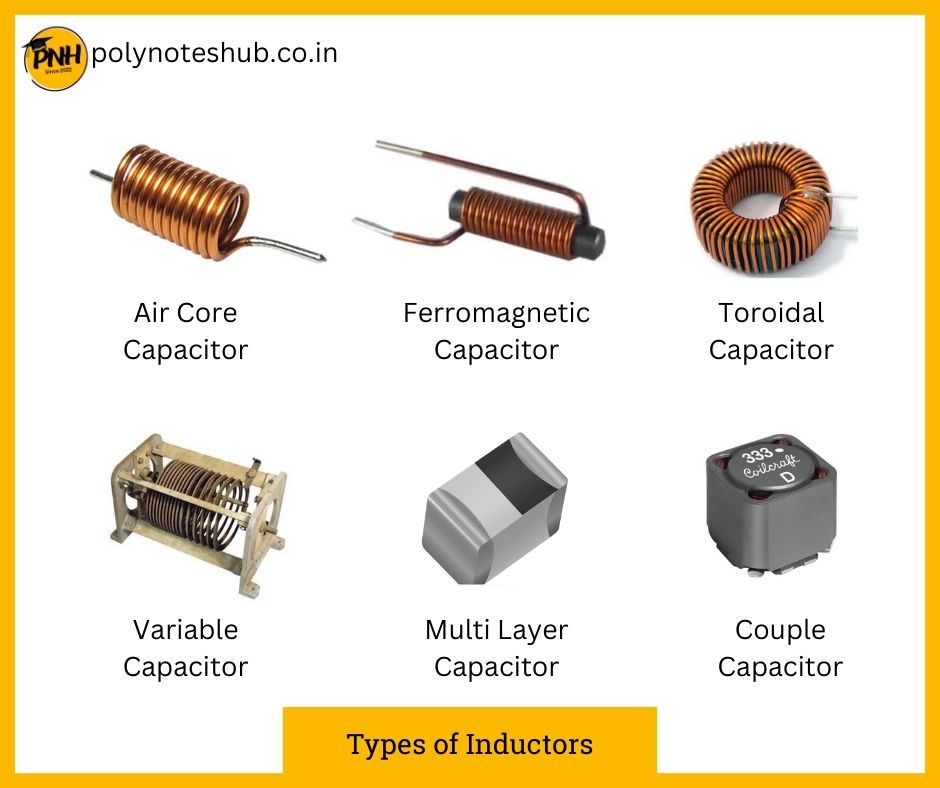
Inductors are usually seen as small grey or black cubes near the CPU socket.
-
Working: An inductor is a coil of wire wrapped around a core (often ferrite). When current flows through it, it creates a magnetic field. This magnetic field resists sudden changes in current.
-
Purpose on Motherboard: While capacitors smooth voltage, inductors smooth current. In the VRM, they work alongside MOSFETs and capacitors to filter high-frequency noise, resulting in the “clean” power necessary for stable overclocking and operation.
6. Integrated Circuits (ICs)
These are the black “chips” with many legs.
-
Working: An IC is a collection of thousands of tiny transistors, resistors, and diodes shrunk down into a single silicon wafer.
-
Purpose on Motherboard: Each IC has a specific job. For example:
-
Super I/O Chip: Manages the keyboard, mouse, and monitoring of fan speeds and temperatures.
-
Audio Codec: Converts digital data into the analog sound you hear in your headphones.
-
Clock Generator: Keeps all components in sync by providing a steady “heartbeat” signal.
-
